



Moltbot 是一款你可以在自己设备上运行的个人 AI 助手。 它会在你已经使用的频道(WhatsApp、Telegram、Slack、Discord、Google Chat、Signal、iMessage、Microsoft Teams、WebChat)以及扩展频道如BlueBubbles、Matrix、Zalo和Zalo Personal上回答你。它可以在macOS/iOS/Android上说话和监听,还能渲染你控制的实时画布。网关只是控制平面——产品是助手。
如果你想要一个个性化、单用户助理,感觉本地化、快速且始终在线,这就是你的选择。
运行时依赖环境:
1.Git 2.0.0及以上
推荐安装 Git 2.20.0 及以上版本(优先 2.30+),兼顾稳定性和兼容性
2.Node.js ≥ 22(必须)
npm或 pnpm
Node 版本过低会导致OpenClaw CLI无法运行。OpenClaw 支持通过 npm 或 pnpm 安装。
一、准备工作
1.选择轻量服务器,安装好 Ubuntu 24.04.1 LTS系统,自代Git
2.环境检测,核对服务器配置
echo "=== 环境检测开始 ===" && echo "1. 操作系统信息:" && cat /etc/os-release | grep PRETTY_NAME && echo "2. CPU核心数:" && nproc && echo "3. 内存大小(MB):" && free -m | awk 'NR==2{print $2}' && echo "4. 磁盘可用空间:" && df -h / | awk 'NR==2{print $4}' && echo "5. Node.js版本:" && node --version 2>/dev/null || echo "未安装" && echo "6. Git版本:" && git --version 2>/dev/null || echo "未安装" && echo "=== 环境检测结束 ==="3.安装依赖
(1) 安装 Git 已有略
https://git-scm.com/
(2)安装 Nodejs (使用nvm)
https://nodejs.org/
# 下载并安装 nvm:
curl -o- https://raw.githubusercontent.com/nvm-sh/nvm/v0.40.3/install.sh | bash

# 代替重启 shell
\. "$HOME/.nvm/nvm.sh"

# 刷新一下环境变量
source /root/.bashrc

# 下载并安装 Node.js:
nvm install 24

# 验证 Node.js 版本:
node -v # Should print "v24.13.0".

# 验证 npm 版本:
npm -v # Should print "11.6.2".
二、一键安装OpenClaw
npm安装一条一条运行命令
# Install OpenClaw
npm i -g openclaw

# Meet your lobster
openclaw onboard
或用Linux安装(2先1)
curl -fsSL https://openclaw.ai/install.sh | bash
三、配置文件
openclaw onboard --install-daemon
1.I understand thisis powerful and inherently risky....
Yes
2.Onboardng mode
QuickStart( 选这个-快速使用)
选择自己的Ai模型(如选国内的MiniMax)
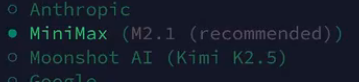
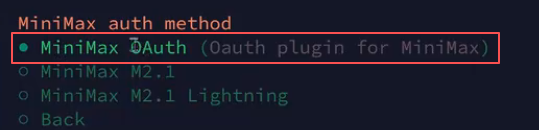
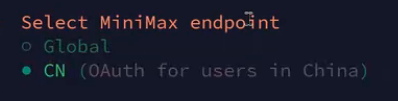
这里是选择国际版,还是中国版本
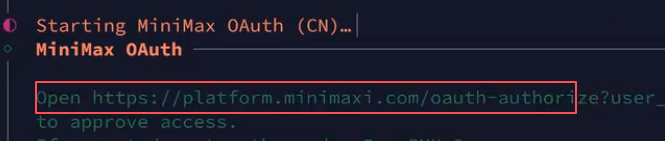
复制链接,通过浏览器打开,并受权。

选择当前大模型。
3.Select channel (quickstart)---选择聊天入口
Skip for now 选择先跳过
4.Configure skills now?(recommended) 配置技能
No
4.配置成功。如果报下面错误,网关错误,运行下面命令
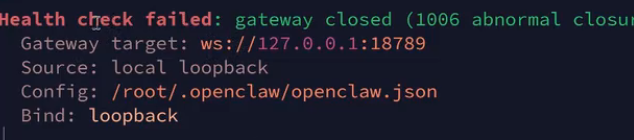
openclaw gateway --port 18789 --bind loopback --verbose/
5.远程访问,首选 Tailscale/VPN;否则使用 SSH 隧道。在本电脑运行CMD
ssh -N -L 18789:127.0.0.1:18789 root@服务器IP用命令行快速移除旧密钥(推荐)
ssh-keygen -R IP输入 yes ; 再输入服务器root 密码;打开浏览器输入下面地址:
http://127.0.0.1:18789如果报1008错误,没有授权,在服务器里输入:
cat /root/ .openclaw/openclaw.json找到token 后面的授权码,复制到浏览器网址后
四、绑定域名
通过运行脚本科技lion一键脚本,按照提示操作
bash <(curl -sL kejilion.sh)如果出现1008错误:
1.SSH安装服务
openclaw daemon install2.启动服务
openclaw daemon start下面网址F5多刷新几次
https://外网IP:18789/?token=156844ebc5e1a65181ad4ae2018dfcd28df4a0356185c09a
3.设备列表---如果没有列表,上面多刷新几次,列表多试几次。
openclaw devices list4.批准访问openclaw devices approve
openclaw devices approve xxx-xxx-xxx-xxx-xxx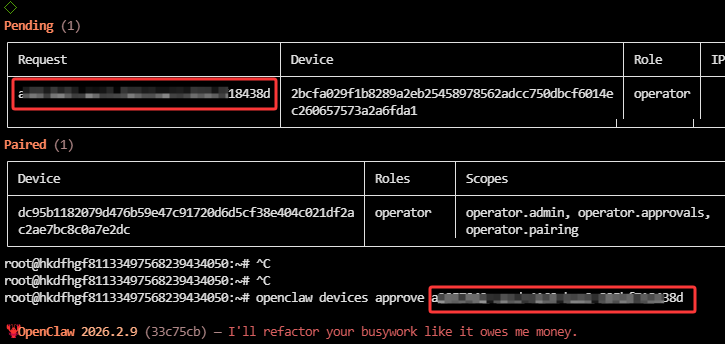
5.访问地址:
https://域名/chat?session=agent%3Amain%3Amain五、飞书
1.服务器输入配置命令
openclaw config选择:
Where will the Gateway run?
Locai (this machine) 本地网关
Select sections to configure
Channels
Configure/link
Select a channel
Feishu/Lark(飞书)
Enter Feishu App ID 粘贴一下
Enter Feishu App Secret 粘贴一下
Which Feishu domain?
Feishu (feishu.cn) -CHina
Group chat policy
open-respond in all groups (全部)
Finished (选择这个完成,不然不生效)
Configure DM access policies now?.......
Yes
Feishu DM policy
Pairing(recommended)
Select sections to configure
Continue (继续)
飞书端请查其他说明:如果事件与回调不能保存和重启一下网关Gateway这个服务
其他教程
六、其他命令
OpenClaw启动停止重启
openclaw status # 命令查看状态
openclaw gateway start # 启动
openclaw gateway stop # 停车
openclaw gateway restart # 重启
运行迎新向导(并安装服务)
openclaw onboard --install-daemon
后台运行
openclaw gateway --verbose
//
后台运行
nohup openclaw gateway --verbose > /tmp/openclaw-gateway.log 2>&1 &
如果您在入职时安装了该服务,网关应该已经启动:
openclaw gateway status
手动运行(前台):
openclaw gateway --port 18789 --verbose
访问地址+key
http://localhost:18789/#token=七、国内模型域名与配置命令
Kimi
国内主域名:moonshot.cn,国外主域名:moonshot.ai
配置命令:
openclaw config set models.providers.moonshot.baseUrl "https://api.moonshot.cn/v1"MiniMax
国内主域名:minimaxi.com,国外主域名:minimax.ai
配置命令:
openclaw config set models.providers.minimax.baseUrl https://api.minimaxi.com/anthropic智谱GLM:
国内主域名:bigmodel.cn,国外主域名:z.ai
无需额外配置
八、飞书权限JSON
{
  "scopes": {
    "tenant": [
      "base:app:copy",
      "base:app:create",
      "base:app:read",
      "base:app:update",
      "base:collaborator:create",
      "base:collaborator:delete",
      "base:collaborator:read",
      "base:dashboard:copy",
      "base:dashboard:read",
      "base:field:create",
      "base:field:delete",
      "base:field:read",
      "base:field:update",
      "base:form:read",
      "base:form:update",
      "base:record:create",
      "base:record:delete",
      "base:record:read",
      "base:record:retrieve",
      "base:record:update",
      "base:role:create",
      "base:role:delete",
      "base:role:read",
      "base:role:update",
      "base:table:create",
      "base:table:delete",
      "base:table:read",
      "base:table:update",
      "base:view:read",
      "base:view:write_only",
      "bitable:app",
      "bitable:app:readonly",
      "board:whiteboard:node:create",
      "board:whiteboard:node:delete",
      "board:whiteboard:node:read",
      "board:whiteboard:node:update",
      "contact:contact.base:readonly",
      "contact:user.base:readonly",
      "contact:user.employee_id:readonly",
      "contact:user.employee_number:read",
      "contact:user.id:readonly",
      "docs:doc",
      "docs:doc:readonly",
      "docs:document.comment:create",
      "docs:document.comment:read",
      "docs:document.comment:update",
      "docs:document.comment:write_only",
      "docs:document.content:read",
      "docs:document.media:download",
      "docs:document.media:upload",
      "docs:document.subscription",
      "docs:document.subscription:read",
      "docs:document:copy",
      "docs:document:export",
      "docs:document:import",
      "docs:event.document_deleted:read",
      "docs:event.document_edited:read",
      "docs:event.document_opened:read",
      "docs:event:subscribe",
      "docs:permission.member",
      "docs:permission.member:auth",
      "docs:permission.member:create",
      "docs:permission.member:delete",
      "docs:permission.member:readonly",
      "docs:permission.member:retrieve",
      "docs:permission.member:transfer",
      "docs:permission.member:update",
      "docs:permission.setting",
      "docs:permission.setting:read",
      "docs:permission.setting:readonly",
      "docs:permission.setting:write_only",
      "docx:document",
      "docx:document.block:convert",
      "docx:document:create",
      "docx:document:readonly",
      "drive:drive",
      "drive:drive.metadata:readonly",
      "drive:drive.search:readonly",
      "drive:drive:readonly",
      "drive:drive:version",
      "drive:drive:version:readonly",
      "drive:export:readonly",
      "drive:file",
      "drive:file.like:readonly",
      "drive:file.meta.sec_label.read_only",
      "drive:file:download",
      "drive:file:readonly",
      "drive:file:upload",
      "drive:file:view_record:readonly",
      "event:ip_list",
      "im:app_feed_card:write",
      "im:biz_entity_tag_relation:read",
      "im:biz_entity_tag_relation:write",
      "im:chat",
      "im:chat.access_event.bot_p2p_chat:read",
      "im:chat.announcement:read",
      "im:chat.announcement:write_only",
      "im:chat.chat_pins:read",
      "im:chat.chat_pins:write_only",
      "im:chat.collab_plugins:read",
      "im:chat.collab_plugins:write_only",
      "im:chat.managers:write_only",
      "im:chat.members:bot_access",
      "im:chat.members:read",
      "im:chat.members:write_only",
      "im:chat.menu_tree:read",
      "im:chat.menu_tree:write_only",
      "im:chat.moderation:read",
      "im:chat.tabs:read",
      "im:chat.tabs:write_only",
      "im:chat.top_notice:write_only",
      "im:chat.widgets:read",
      "im:chat.widgets:write_only",
      "im:chat:create",
      "im:chat:delete",
      "im:chat:moderation:write_only",
      "im:chat:operate_as_owner",
      "im:chat:read",
      "im:chat:readonly",
      "im:chat:update",
      "im:datasync.feed_card.time_sensitive:write",
      "im:message",
      "im:message.group_at_msg:readonly",
      "im:message.group_msg",
      "im:message.p2p_msg:readonly",
      "im:message.pins:read",
      "im:message.pins:write_only",
      "im:message.reactions:read",
      "im:message.reactions:write_only",
      "im:message.urgent",
      "im:message.urgent.status:write",
      "im:message.urgent:phone",
      "im:message.urgent:sms",
      "im:message:readonly",
      "im:message:recall",
      "im:message:send_as_bot",
      "im:message:send_multi_depts",
      "im:message:send_multi_users",
      "im:message:send_sys_msg",
      "im:message:update",
      "im:resource",
      "im:tag:read",
      "im:tag:write",
      "im:url_preview.update",
      "im:user_agent:read",
      "sheets:spreadsheet",
      "sheets:spreadsheet.meta:read",
      "sheets:spreadsheet.meta:write_only",
      "sheets:spreadsheet:create",
      "sheets:spreadsheet:read",
      "sheets:spreadsheet:readonly",
      "sheets:spreadsheet:write_only",
      "space:document.event:read",
      "space:document:delete",
      "space:document:move",
      "space:document:retrieve",
      "space:document:shortcut",
      "space:folder:create",
      "wiki:member:create",
      "wiki:member:retrieve",
      "wiki:member:update",
      "wiki:node:copy",
      "wiki:node:create",
      "wiki:node:move",
      "wiki:node:read",
      "wiki:node:retrieve",
      "wiki:node:update",
      "wiki:setting:read",
      "wiki:setting:write_only",
      "wiki:space:read",
      "wiki:space:retrieve",
      "wiki:space:write_only",
      "wiki:wiki",
      "wiki:wiki:readonly"
    ]
  }
}
评论区